Getting Started with MAUI + MVVM + Database

The art of programming is the art of organising complexity and then not thinking about it any more.
Edsger W. Dijkstra
Overview
This comprehensive tutorial teaches you to build cross-platform mobile applications using .NET MAUI (Multi-platform App UI), the MVVM (Model-View-ViewModel) architectural pattern, and PostgreSQL database integration. Rather than learning these technologies separately through multiple refactoring cycles, you’ll work with a production-quality application from the start and progressively enhance it.
What makes this tutorial different:
- Start with real code: Download and modify a working multi-project MAUI application
- Learn by refactoring: Transform an authentication app into a note-taking app
- Build for the future: Implement patterns that support REST API integration
- Use modern tools: PostgreSQL in Docker, Entity Framework Core, CommunityToolkit.Mvvm
- Understand architecture: Multi-project solutions, dependency injection, repository pattern
What You’ll Build
Starting with the StarterApp (a multi-project MAUI application with authentication, roles, and PostgreSQL), you’ll transform it into a complete Note-Taking Application with:
- Note creation, editing, and deletion (CRUD operations)
- Category organisation with color coding
- Database persistence with Entity Framework Core
- MVVM architecture using CommunityToolkit
- Repository pattern for data abstraction (ready for API integration)
- Database migrations for schema evolution
Prerequisites
Before starting this tutorial, you must have:
- Completed the dev-environment tutorial - you need Docker and PostgreSQL running
- Basic C# knowledge: classes, methods, properties, async/await
- Git basics: clone, commit, push
- Development environment:
- Visual Studio Code with Dev Containers extension
- .NET 9 SDK (installed automatically in dev container)
- Docker Desktop running
- PostgreSQL container from dev-environment tutorial
Time commitment: 6-9 hours total across five parts
Learning Objectives
By completing this tutorial, you will be able to:
- Understand and work with multi-project MAUI solutions
- Implement MVVM pattern using CommunityToolkit.Mvvm
- Design and implement database models with Entity Framework Core
- Use PostgreSQL with .NET applications via Npgsql
- Create and apply database migrations for schema changes
- Implement repository pattern for data access abstraction
- Use dependency injection throughout an application
- Build complete CRUD functionality in MAUI
- Navigate between views using Shell navigation
- Prepare applications for future REST API integration
Tutorial Structure
This tutorial is divided into five progressive parts:
Part 1: Download and Explore StarterApp (60-90 minutes)
Download the PostgreSQL-ready StarterApp and explore its architecture:
- Multi-project solution structure
- Existing MVVM implementation with CommunityToolkit
- Entity Framework Core with PostgreSQL
- Authentication and authorisation patterns (before simplifying)
- Apply existing migrations to local database
Key learning: Understanding production-quality code organisation
Part 2: Simplify to Note-Taking App (120-150 minutes)
Remove authentication complexity and create a new domain model:
- Create Note and Category models
- Update DbContext and generate migrations
- Remove authentication services and ViewModels
- Create NoteViewModel and NotesViewModel
- Build Note views with XAML data binding
- Update Shell navigation for the new app
Key learning: Modifying existing architectures for new requirements
Part 3: Add Repository Pattern (60-90 minutes)
Abstract data access for future API integration:
- Design INoteRepository interface
- Implement NoteRepository for local database
- Refactor ViewModels to use repository
- Document future ApiNoteRepository implementation
- Understand dependency injection for swappable implementations
Key learning: Preparing for distributed architectures
Part 4: Advanced Migrations (45-60 minutes)
Master database schema evolution:
- Add new properties to existing models
- Generate and apply migrations
- Seed default data
- Understand migration history
- Best practices for team collaboration
Key learning: Managing database changes over time
Part 5: Testing and Verification (30 minutes)
Validate your complete application:
- Complete CRUD workflow testing
- Navigation verification
- Data binding checks
- Database persistence validation
- Extension challenges for advanced students
Key learning: Systematic testing approaches
Technology Stack
| Component | Technology | Purpose |
|---|---|---|
| UI Framework | .NET MAUI 9.0 | Cross-platform mobile/desktop UI |
| MVVM Toolkit | CommunityToolkit.Mvvm 8.x | Simplified MVVM implementation |
| Database | PostgreSQL 16 | Relational data storage |
| ORM | Entity Framework Core 9.0 | Object-relational mapping |
| Database Provider | Npgsql.EntityFrameworkCore.PostgreSQL | PostgreSQL EF Core support |
| Dependency Injection | Microsoft.Extensions.DependencyInjection | Service registration and resolution |
| Navigation | MAUI Shell | Declarative routing and navigation |
Architecture Overview
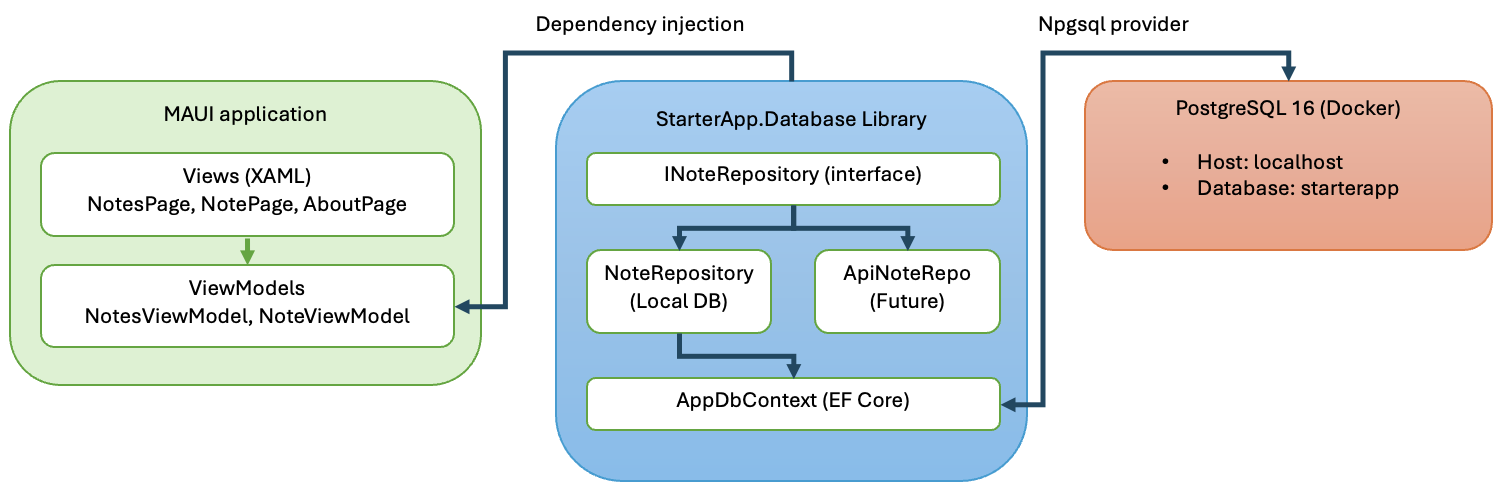
Why This Approach?
Traditional approach (separate tutorials):
- Build basic MAUI app with file storage
- Refactor to add MVVM
- Refactor to add database
- Refactor to use proper patterns
- Students ask: “Why didn’t we just do it right the first time?”
This tutorial’s approach:
- Start with production-quality multi-project architecture
- Learn by reading and understanding existing code
- Practice refactoring for new requirements (real-world skill!)
- Understand WHY each pattern exists by seeing it in context
- Build muscle memory for doing it right from the start
Getting Help
- Troubleshooting: See C# Troubleshooting Guide
- MVVM Reference: See StarterApp MVVM Documentation
- Navigation Reference: See StarterApp Navigation Guide
- PostgreSQL Issues: Review dev-environment tutorial
Next Steps
Ready to start? Proceed to Part 1: Download and Explore StarterApp to download the PostgreSQL-ready StarterApp and begin exploring its architecture.
| Estimated time: 6-9 hours total | Difficulty: Intermediate | Prerequisites: dev-environment tutorial, basic C# |